Build your resume with Us for free

V1.0 · First Release — We're just getting started! More exciting features and ATS-friendly resume templates are coming in future updates.

Pick a layout, add your experience, and tailor your resume to the job. Every Ginger Drafts template is free to edit, with no sign-in required.


Where does your resume get stuck?

A good starting point makes these common drafting problems easier to solve.

A blank first page
Columns that read out of order
Experience buried on page two
A different format for every date
Bullets that sound like a job description
A paywall after the final edit

A place for every part of your experience

Start with the section that gives the clearest evidence for the role you want.

Work experience icon

Work experience

  • Job title and employer
  • Consistent employment dates
  • Achievements in your own words
Education icon

Education

  • Degree or training program
  • Relevant coursework
  • Graduation date
Projects icon

Projects

  • Project goal
  • Tools and methods
  • A result you can explain
Skills icon

Skills

  • Role-specific tools
  • Technical skills
  • Languages and certifications

What goes into a readable resume?

Use these nine details to give a reader a clear path through your qualifications.

Single-column layout icon

Single-column layout

Keep dates and job details together in one reading order.

Contact details icon

Contact details

Use an email address you check regularly.

Target role icon

Target role

Name the kind of role you are applying for.

Profile summary icon

Profile summary

Introduce your strongest relevant experience in a sentence or two.

Experience headings icon

Experience headings

Keep each job title next to its employer and dates.

Achievement bullets icon

Achievement bullets

Describe a task, your contribution, and its outcome.

Education details icon

Education details

Include relevant training, qualifications, or coursework.

Relevant skills icon

Relevant skills

List tools and methods you have used yourself.

Portfolio links icon

Portfolio links

Add links you have checked and can share publicly.

Five building blocks of a resume

CONTACT icon
01

CONTACT

Put your name and a reliable way to reach you at the top.

PROFILE icon
02

PROFILE

Summarize the experience most relevant to your target role.

EXPERIENCE icon
03

EXPERIENCE

Pair each role with dates and examples of your work.

EDUCATION icon
04

EDUCATION

List relevant degrees, training, or certifications.

SKILLS icon
05

SKILLS

Choose skills you can describe with a specific example.

Ten details you can edit for free

Name
Given nameFamily name
$0 to edit
Contact details
EmailCityPortfolio
$0 to edit
Professional profile
Role summary
$0 to edit
Job titles
PositionSenioritySpecialtyTeam
$0 to edit
Employer names
EmployerDivisionBranchLocationTeam
$0 to edit
Employment dates
MonthYearPresent
$0 to edit
Achievements
ActionOutcome
$0 to edit
Work experience bullets
GoalContribution
$0 to edit
Education
DegreeSchoolCourseYear
$0 to edit
Skills
ToolsMethods
$0 to edit

Why we built Ginger Drafts


Ginger Drafts

Ginger Drafts

A note from the team

Your first draft should start with your experience. A blank page can make even familiar work difficult to describe. A simple template gives you a place to start.


We built Ginger Drafts around a small decision: open a layout and get straight to the words. You can edit every template for free without creating an account.

Start with a small first draft
1. Choose the section order
2. Replace the example text
3. Read it as a hiring manager would

A resume is a working document. Revisit it whenever you finish a project, learn a skill, or apply for a different role.


Your resume review checklist

Three checks before you send your application

Read your draft alongside the job description. Mark the experience that helps a hiring manager understand why you fit the role.

Use the checklist for a final pass through the content and formatting.
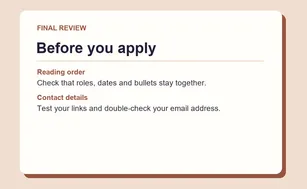
  • Reading order. Check that each role, date, and bullet reads in sequence.
  • Evidence. Give a concrete example for each skill you highlight.
  • Contact details. Open your portfolio link and double-check your email.
Resume review checklist

Questions about your resume

A few details about choosing a template and making it your own.

Open the templates
Yes. Every template is free to open and edit.
You can open a template and change its text without creating an account.
The three single-column PDF layouts use familiar headings and keep text in one reading order. Follow the file instructions in the job posting.
Monochrome Professional uses clear section bands. Centered Technical gives achievements their own section. Sage Corporate places education and skills in a sidebar.
Save the PDF you plan to send, then revise your summary and bullets for the next role. The builder saves one draft per template in this browser.

Ready to write your next resume?

Choose a free Ginger Drafts template and start editing without signing in.

Choose a free template
WELCOME TO GINGER DRAFTS

Your next opportunitystarts here.

Thanks for visiting Ginger Drafts! No sign-up required. Create, customize, and download your resumes for free.